Showing posts with label video production. Show all posts

Monday, February 10, 2014

Blackmagic Production Camera 4K is Here!!! And it's CHEAPER - YAY!!!

I just received word from BMD that the BMPC 4K is shipping as of today.  I checked B&H and a few other sites and they are still showing it as a pre-order item but the press release just hit a few hours ago.  Along with the terrific news of official shipping it is also making it's debut at a lower price point $2995.  Down $1K from the original MSRP.  It is still shipping with a full copy of Resolve  and appears not to have lost anything in the process.  First thing I checked was the BMD site for the specs and everything still appears to be there so it's all good.  Hopefully as the units start making their way into the market a few review units will drift into bloggers hands =)  I'll keep you posted.  For now please see the full press release below and let me know your thoughts.

Fremont, CA - February 10, 2014 - Blackmagic Design today announced the Blackmagic Production Camera 4K is now shipping and with a new low price of US$2,995. This new low price will be available for all customers, including existing pre-orders. Blackmagic Production Camera 4K is available now from Blackmagic Design resellers worldwide for only US$2,995.

“The support from the creative community for the Blackmagic Cinema Camera and Production Camera 4K has been amazing,” said Grant Petty, CEO, Blackmagic Design. “As with all of our products, we work hard in production to reduce costs so we can pass along the savings, even to our first Blackmagic Production Camera 4K customers. The Blackmagic Production Camera 4K is a perfect companion for ATEM Production 4K switchers and we hope the new low price will help more customers to expand their Ultra HD live production set ups with even more camera angles!”

Blackmagic Production Camera 4K is a super high resolution 4K digital production camera for Ultra HD television production. Featuring a large Super 35 sensor, professional global shutter as well as EF and ZE compatible lens mount, the Blackmagic Production Camera 4K captures high quality ProRes™ files, giving customers a complete solution to shoot amazing high resolution music videos, episodic television productions, television commercials, sport and documentaries.

The Blackmagic Production Camera 4K has everything customers need right out of the box including a built in SSD recorder, rechargeable battery and a large 5” LCD touchscreen. In addition to focusing and monitoring shots, the touchscreen also lets customers enter metadata and change camera settings all on a single easy to use interface. Customers also get a full copy of DaVinci Resolve for amazing quality color grading and finishing for Mac OS X and Windows computers.

  • Ultra HD 3840 x 2160 resolution
  • ProRes 422 (HQ)™ recording
  • Super 35 sensor
  • Global shutter
  • EF and ZE compatible lens mount
  • Built-in SSD recorder
  • 5” LCD touchscreen
  • Metadata entry
  • 6G-SDI output for 10-bit HD and Ultra HD
The Blackmagic Production Camera 4K is available now for US$2,995 from Blackmagic Design resellers worldwide.

Until next time, Good shooting

TDTrey

Wednesday, October 30, 2013

Blackmagic Design and Mavericks update

I was just notified by BMD that they have updates that now support Mavericks OS X 10.9:
  • The new updates include OS X Mavericks compatibility and interface enhancements for the new operating system and are immediately available for DeckLink, UltraStudio and Intensity Desktop Video products.
  • Customers can now download the Blackmagic Design software updates free of charge from the Blackmagic Design website.

    -Blackmagic Design
If you have been reading any of my recent posts regarding the saga of OS 10.8.5 and the never ending grey screen then you know I am very happy to hear I can move up to Mavericks and still continue using my BMD cards and software.

Please visit their web site to read the full press announcement from earlier this week.

Thanks for stopping by.

Until next time, Good shooting

TDTrey

Monday, September 16, 2013

SmallHD AC7 Field Monitor

What a great monitor....  The End

OK, ok. Maybe a little more is needed =)

Earlier this summer I was prepping a project and the DP had asked for a larger monitor with a really good sun shade.  I was using an older 5" HDMI monitor.  We were shooting on my 5D3 and were going to be on the move over the 5 days of shooting.  So I started looking at my options.

I had checked out the SmallHD AC7 and it's bigger brother the DP7 at CineGear and was very impressed.  Both monitors had a really nice look and feel and were well built.  I'm very partial to the way SmallHD handles their focus assist features.  The peaking in these monitors reminds me of the peaking in my old BetaCam cameras.  When you're on, you are on!! and you can see the focus plane coming/going as you are rolling through focus.  Really helpful with DSLR shooting. The 5D3 staying in HD during recording is also very nice.

So as I said I was going to be in the field (or actually on an island) for 5 days shooting mostly "Run and Gun".  We weren't going to be able to charge batteries during the day and the rig had to be really light and nimble.  Pictured here is my Hand Held rig:
I found the easiest thing was to set up the 5D3 on a Manfrotto raiser with 12" rods and use a Ultralight 15mm rod accessory to add the monitor via a cine arm.  (Say that 3 times fast =)  This put the monitor almost right over the camera body and still left access to the battery door and CF card slot.  To keep the weight down I used the Canon battery plate from SmallHD.  This allowed me to use all the same batteries for the monitors and cameras.  In this config we really didn't need a follow focus and normally left the mattebox off as well.  At night we could run without the sunshade leaving a much wider angle of view for the shooter and any one around him.  I didn't have it at the time but have since added a LockPort to protect the mini HDMI connection on the side of the camera.

The monitor was flawless.  The HDMI port is on the bottom so it was very easy to run the cable under the lens and straight up into the monitor.  It is very light weight.  The screen is quite bright and clear.  The shade helped the daytime shooting immensely.  We could make it about 4 hours on one pair of batteries. ( the plate is set up for 2 batteries to run together extending the over all running time.)  When the batteries are down to about 10% the screen changes to the AC7 logo and starts flashing.  (Can't miss that warning =)  Pop two fresh batteries on and you are ready to go another 4'ish hours.  You can get a variety of different battery plates to match your kit batteries and needs.

The monitor comes in two versions: an HDMI only version or an HDMI / HD-SDI version.  I went for the HDMI version at the time but am now thinking about getting the combo HDMI / HD-SDI version.  That way I can hang it off my EX3 or the H2S converter on my 5D3 / Blade kit.

The menu is easy to navigate and has a dial entry approach along with two assignable button for shortcut features and menu functions.  There are a number of guides that can be assigned as well as false color, etc.  Truly a well thought out monitor.

Well just my first impressions of the monitor.  Very happy.  It now lives in the 5D3 bag.  I'll give an update as I use it more this year.  Thanks again for reading my post.

Until next time, Good shooting

TDTrey.com


Thursday, August 29, 2013

ATOMOS Samurai Blade

So, the afternoon that the Samurai Blade was first in stock at B&H, I ordered it.  I had been waiting a while for it to be available and was happy it was finally on it's way.

At CineGear I was able to check out quite a few recorders including the Atomos Samurai Blade and the Convergent Design Odyssey 7.  Both are excellent recorders.  Both have terrific feature sets.  Both are priced at $1295 USD. 
I went with the Blade.
  • It's 5.5" screen makes it a nice tiny recorder to hang on any rig.
  • It has a non proprietary storage media solution. (the Odyssey uses Convergent Design's own SSDs to ensure compatibility with the recorder)
  • With the Blade, you can use SSDs or spinning 2.5" hard drives right from your local computer store (as long as they meet the specs required by Atomos)  The fact that you can use spinning drives is one of the main reasons I went with the blade.  I can use a 500 gig laptop drive for tripod shoots and it will only cost me $60 or so and yields almost 5 hours of ProRes HQ.  For "run and gun" I'll probably want to use SSDs because of the risk of shock to the drives.
  • I can run all day on a couple Sony NP-F970 batteries.
  • The Blade works well with both my EX3's SDI out and my 5D3's HDMI out.  For the HDMI from the Canon 5D3 I use the Atomos H2S converter.  It converts HDMI to HD-SDI and does 3:2 pulldown removal in real time.
  • The focus assist features work like my Zacuto EVF and SmallHD AC7 monitor.  I can see the focal plan coming my way as I roll through focus.
  • The waveform feature is very handy and pretty much a necessity these days on DSLR shoots.
One of the other things I've been waiting for in a recorder is the ability to delay the audio coming into the recorder to compensate for the 5 frame LAG the Canon 5D3 has on it's clean HDMI output.  When feeding the recorder audio directly you'll end up with your picture behind your audio 5 frames.  Those clips will then need to be slipped back into sync on the timeline during editing.  However, (this was great) I wrote Atomos about the LAG and asked if there was anything in the works at Atomos to help.  The next day (at 3:02 am) Tech support sent me an e-mail saying they had released a new firmware update that morning and added an audio delay function and way better audio meters.  I was stoked as those were really the last 2 minor things that disappointed me about the Blade.

The Convergent Design Odyssey 7 and 7Q look like excellent recorders as well.  At the time I needed my recorder the Odyssey units weren't shipping and did not yet offer ProRes.  They are projected to ship a little later this year.  The 7Q will be able to do up to 4K resolutions  and also record in camera raw formats.

All in all I think the Atomos Samurai Blade is a great choice for a flexible external field recorder and one that I will be able to use for some time to come.  As we all move ever closer to the 4K world new technology is going to keep sneaking up on us.  But for now HD recorders are a great way to go.

Until next time - Good shooting

Tuesday, February 26, 2013

Adobe CS6 Production Suite and The Animated Fairytale

Well, we just finished recording the narration for our new animated short - working title: "The Birthday Princess".  It's a cute story about a princess and her mother, the queen.  The princess learns many life lessons during one wonderful afternoon.

We recorded at Stewart Sound in Santa Ana, California using ProTools as our DAW.  All the files are in straight AIFF.  Dave Myslek, "Wookie", our engineer was awesome!!!  From there we will move almost completely into the Adobe Production Premium CS6 suite. We are editing the dialog in Adobe Audition for the rough cut.  We'll also use Audition for the final sound design and mix out at the end of the project.  In the middle we will use a combination of Premiere Pro 6 and After Effects to bring the animation to life.

Once the dialog is roughed in we will be giving it to our animators.  We'll continue the sound design during the animation process and give them the final audio locked dialog + M&E tracks in the home stretch for fine tuning.  We'll then use Premiere to do the final video edit and layback of the mix.  Output will be done with Adobe Media Encoder.

We are using Smart Sound to create the music. Their product, Sonic Fire, is a fantastic tool to create an "almost" original score.  If you haven't checked this software out yet, I highly recommend it.  You can create very original sounding pieces of music from their library and tailor the cues to meet and match your project.  Add hits, mood changes and even variations in side of one long piece of music.  We pulled our temp tracks while we were editing the narration selects - Very Cool.

This is one of the new projects we are starting for 2013 at Polydactyl Pictures.  We hope to have good luck with it at the festivals.  It will also allow us to build "the machine" a little more before jumping into some of the larger projects we have on the horizon.

I realized this piece sounds a lot like a sales pitch for many of the software companies - but I really just want to show a step by step of the process.  I want indie filmmakers have yet another road map to follow showing different kinds of projects and their workflows.  Indies (including ourselves) need to have resources at our fingertips to help keep us creative and forward thinking =)

Stay tuned.  I'll be posting our progress on "The Birthday Princess" as we go.  When we find out something cool (or problematic) I'll give you an update and suggestions.

Until next time, good shooting, editing, animating, mixing....

Friday, December 28, 2012

Rokinon Cine Lenses-Second Look

Still loving the Rokinon Cine lenses.  I have three now: the 24mm, 35mm for a few months and the 85mm just came in last week.  All the lenses are at a T1.5 max exposure. 

The 85mm is a little smaller than the 24 and the 35.  It still has both an iris gear and a focus gear.  Very handy for jib work.  Since this one just came in, I haven't had a chance to test it in the field yet - but plan to in January.


The build quality is just as amazing.  The markings are nice and bold (although still only on the driver's side).  The gears seem to work nicely with my FF.  And... the 85mm has a deep filter thread.  I ordered from B&H so I also ordered a Tiffen UV filter to go with.  The pair shipped as one and I knew that I would have the lens protected as soon as it arrived.

I'm hoping the rumors about a 50mm Cine lens are true.  I would like to round out my basic prime set now and then start adding T&S lenses and other more specialized glass later in 2013.

I'll keep you posted as I put this one through it's paces on the F3 and the 5D2...

Until next time, good shooting.

TDTrey.com

Friday, December 21, 2012

My F3 Christmas Wish List

OK.  So we didn't all blow up today - YAY!!!  Now it's time to start thinking about questions for the big man in red ( and I don't mean Jim Jannard =)

Here's my wish list for my Sony F3 from Sony in 2013:
  • Could we get an upgrade for 4:2:2 internal recording with 50 m/bits throughput?
  • Is there enough processing power to give us RAW out of the F3?
  • If the sensor is 4K can it be De-Bayer'd down to 2K to an external recorder?
  • Can we us the new faster SxS cards with an upgrade to the firmware?
  • If not free, could this be done for a purchased upgrade under $2000?
So,  obviously what I'm aiming for here is a 2K RAW F3 upgrade for under $2000 to extend the life of our cameras as we start to save up for the F5 and F55.  I think we'll need another year or two for 4K to be requested by clients and this gives us a path to stick with and the ability to use our current configurations a little longer.

Seems like there is 'a storm a brewin' for the 4K market but we won't know anything until it passes.  If these cameras can be upgraded for a few bucks now and stay relevant until the new crop (no pun intended ) of sensors is released - could be a good thing.

Just thinking out loud... Santa Sony are you listening???


Merry Christmas and Happy Holidays to everyone.  I look forward to hearing from you in 2013 =)

Until next time, good shooting.

TDTrey.com

Monday, August 27, 2012

Rokinon Cine Lenses-First Look

Just got the sneak release of the Rokinon 35mm T1.5 Cine lens from B & H -- Wow.  Very impressed with it out of the box.


I'm going to be using it on my F3 so the build quality needs to be OK and lets face it... It has to look a little impressive besides being sharp.  I did a lot of research on the Bower, Samyang, Rokinon brands (they are all the same manufacturer) and thanks to information found on KenRockwell.com site and a few other sites these lenses seem really sharp in comparison to their Nikkor counterparts.  I thought I would give them a try and report back.  They aren't supposed to be out until September but a few got released early and I was able to get one.  I'm waiting for the 24mm, 50mm and 85mm.

Build quality is very nice at first blush.  Not all plasticy.  The witness marks are on the left side only.  Barrel rotation is about 180 degrees and smooth.  Aperture rotation is smooth as well.  Image looks nice and sharp on the first tests.  Bokeh is creamy.  It is a full frame or FX lens so compared to my 5D2 where it's a 35mm it's more like a 50mm field of view on the F3.

All in all a nice lens so far.  More to follow...

Until next time, good shooting.

TDTrey.com

DaVinci Resolve 9 Flippin' Fastastic

Black Magic Design released the Beta version of their new DaVinci Resolve 9 Lite week before last.  You can download it for the Mac here.  

It's a great new look and feel to this wonderful application. I love the new layout.  Still has all the tools you need -- they are just in a better placement now.  And, you don't have to be as much of a rock scientist to figure out how to "make it go"  =)

I decided to jump in with both feet.  My friends are on the home stretch of their first feature and asked if I would be willing to have a go at the grading.  I said...Suuuure, why not.  It's a fun vampire flick with all sorts of twists and turns.  It was shot on the Panasonic HVX 200.  INT's, EXT's and mixed lighting - a real good test.  Check it out here.


The new layout only took a little while to get familiar with and helped to really speed things up.  Things I liked best right out of the gate:
  • Improved Layout
  • Better Scene Detection feature
  • Smarter HSL keying
  • Easier access to Primaries and Wheels
  • Smart gallery access
  • Fantastic Motion Tracking!!!!!!
    • Super easy to use and link
  • Delivery TAB for outputting
  • Premiere Pro 6 support
This is all from me using the Beta 3 version for only about a week.  As I dig into the app I'll update this post.  Feel free to add comments to help all the readers =)
I got this project as a full length ProRes movie and used the scene detection feature to split it up and conform it.  Took just a little tweaking and it worked great.  A lot of the content is set in a dark or flat location so I had to pickup a few of the cuts as they were hard to discern for the detection threshold I had set - No biggy.

The vignette and power window features are very nice.  Made it easy to correct windows, clothing, walls... everything!!!

The delivery TAB is now super easy to use.  You can make your own custom  output settings and then save them for future use or just take advantage of one of the many presets.  A new feature I like is the fact that you can set multiple outputs and then place them in the render que and walk away.  Each output can have it's own settings and destination.

Well, that's it for now.  I'll add more as I go.  Just wanted to give props to BMD for delivering such a great update to an already awesome tool.

Until next time, good... grading

TDTrey.com

Monday, July 9, 2012

Premiere Pro CS6 and 6.0.1

OK. So I've been on CS6 for about 5 weeks now.  I like a lot of the new features: better trimming, adjustment layers, Warp Stabilizer built in to Premiere Pro directly.  When up and running it's great.  But in the last week I've had some issues with my tower stuttering and freezing.  I called Adobe last Friday at the end of the day and tried to give them a detailed explanation of the issue - they were very kind but kept passing me around from department to department... Frustrating.  Well I did a little more digging on my system and found a few more answers on my own.  Then, low and behold, I got a phone call from one of the lead tech support guys this morning following up as they could see there was not a resolution to the issue yet in the report.  VERY COOL =)

Well the tech spent almost an hour with me on the phone and went through all the nooks and crannies of my Mac Pro to determine where the problem might be.  We tracked it down to a probable conflict with some behind the scenes apps interfering with the PPro performance.  (Keep in mind that this system is an 8 core, 2.93 Ghz box with 24 gigs of RAM and separate GPU and GUI graphics cards, RAID 5 @ 200MB/sec -- not a sleeper)  We set up a ROOT account to log into and ran PPro 6.0.1 with no problems.  This means it must be in the building of my main account - not the Boot Drive or the system.  Good, I don't have to blow the drive --  bad, I have to pluck out the offending sub apps or slowly bring across my prefs from the old account to the new one and the delete the old one when I've got a solid new one... Tic Toc - but doable.

I've been testing 6.0.1 on my 17" MBP and found it really nice, fast and friendly.  The issues were only with the big tower.  PPro 6 seems a lot like FCP 7 (or 8 =)  I think Adobe is really coming along with this product.  Very happy about that!!!  I'm moving almost 50 percent of my work into DSLR territory and the file size and Xfer/conversion time is a killer on fast turn arounds and on-set reviews.  I love just dropping the native files into PPro and going.  Hoverscrub and JKL functions really help to speed up the process of logging and picking clips on set.  I'm waiting for PluralEyes 3 to come out and everything will be in place.

The majority of my work these days are talking heads for docs and sound bites so being able to turn them quickly is important.  I cut a series of interviews with CS 6.0 and was very pleased with the adjustment layers and the sound control.  I was prepared to got out to Davinci Resolve and Audition if I needed to but instead elected to stay in Premiere the whole time and make a go of it.  The client was very happy and didn't need a second round of changes - Yay!!!

Overall I think Premiere Pro is moving forward quite nicely.  Probably by 6.5 we'll be in a place that feels a lot like where we left off with FCP7 - Sorry Apple... Still love the computers =)  I'm very happy with the openness of Adobe to listen to our needs and then do there best to get us the updates ASASP.  I think letting Apple do what they want to do - computers and mobile devices and letting software developers work on what the really want to work on will give us the best result in the long run... Too wordy???

Well that's it for now. Until next time, good shooting and good editing.

TDTrey.com

Saturday, April 7, 2012

SmallHD HDMI Active Splitter

Life Saver!!!!

I just recently added a Zacuto Z-Finder EVF to my 5D2 package. (Really great tool to have in your kit) But I was having a little trouble routing my signal through the whole rig. I was going from the 5D to the EVF and then looping out to the Black Magic Design HDMI to SDI converter. While the loop-thru works pretty well, it appears to sometimes be a little intermittent. I think it has something to do with the handshake between all the devices. Thus the SDI feed going out to the client monitor would cut in and out occasionally.

Enter the HDMI active splitter from SmallHD. The unit is about the size of a Zippo lighter (for those of you who can remember a Zippo =) and is self powered drawing it's juice from the inherent 5V present in the monitor/device connections. It has a great little hook at the top that is perfect 1/4-20 size. There is a little LED at the bottom to indicate if you have 1 or both HDMI outputs in use. Green for 1 and Yellow for both.

The configuration of the connections is really nice. The bottom has an HDMI IN and Out. The top has the HDMI OUT and optional power inputs if needed. The power connectors are 1 DC barrel and one mini USB. I found these were not needed in my rig and wouldn't be needed unless I was looping a bunch of these little guys together or doing really long cable runs.

The active splitter sends full 1080 HD out each output and maintains individual handshakes with each of the devices connected. The BMD converter's signal is really stable when the splitter is in line. The one thing I noticed in my testing is that you have to power up the rig after everything is connected to make the handshake process work correctly. Once I did that it was perfect.

I'll do an update to this post in a few weeks after I have used the system a little more. I just wanted to get the word out how cool this little guy is. And he's built right here in the USA in North Carolina. The price is a mere $59 and the shipping is fast and easy. Pretty Cool =)

Until next time, good shooting.

TDTrey.com


Thursday, April 5, 2012

Lovin' Premiere Pro 5.5

Well we are coming up on a year since Apple decided to improve Final Cut Pro for us... And while there are several sites and sources dedicated to the training needed to learn FCP X, it is still lacking in many of the features that we use every day as editors.

Like many video professional last summer, I decided to give Premiere Pro (PPro) a try. I figured that if I was going to have learn a new NLE anyway I might as well make it one that is going to be around for a while. Plus Adobe was giving us that really great deal if we were switching from FCP. Who could pass that up?

So just a couple quick notes on my progress.
  • I like using the FCP keyboard shortcuts. I feel right at home. I hope that they will bring even more of the shortcuts over as the app improves.
  • Bringing in all of my footage with out transcoding is awesome.
  • Knowing I'm using all the horse power under the hood is also great.
  • Dynamic Linking is real handy for moving from app to app in the suite.
These features along with many of the improvements that are coming down the line are going to make PPro an editing force to be reckoned with.
That's just a quick look at Premiere Pro 5.5 from my perspective =)

Until next time, good shooting.

TDTrey.com

Sunday, March 18, 2012

The Zacuto Z-Finder EVF Pro

The Zacuto Z-Finder EVF Pro - in a word, AWESOME!!!

I finally broke down and bought one this year. (What was I waiting for?) I got it last week for an upcoming 5D2 job and got to use it on an unexpected car spot a few days later. Almost all out side - could have really been difficult. The EVF Pro made it very easy. I used the Zebras and the Action Safe makers all day.

The 16:9 Sun Mask is a must. (DON'T TAKE IT OUT) it is very easy to burn the LCD when shooting out doors - It will happen in just a few seconds. And, the burn ins are YELLOW!!! not black or grey like the old BETACAM days...

I was very pleased with the auto scaling for the 5D REC compensation and the HDMI loop through. I had to put one stage of extension in to get the diopter in range for my eyes. Easy to do. I added an eye cushion to the eye cup for the comfort (and the look factor =). I'm mounting it to my Easom cage with a cine arm right now but will be checking in to something better in the future. I put a Switronix DC cable on it from my Hawk-Woods VL-DC5X D-Tap battery brick distribution system so the whole rig can be powered off of one brick. In the end I think we are all still trying to make these DSLR rigs like our old shoulder camcorders with all the new features of the sensor size and sensitivity.

With all the goodies coming out this year I think it's a good time to start streamlining your rig and this monitor is a great start. Definitely check it out at the next HD gear show you go to and watch the Zacuto video series on the the EVF - well worth the time.

Until next time, good shooting.

TDTrey.com

Thursday, March 8, 2012

Which Camera (cont'd) 2012

Well it's 2012... Yeah!!!

And now we have a few more camera choices - woo hoo!!!

The Canon 5D Mark III is finally on the horizon with the Nikon D800 giving it a good run for the money. The flagship DSLRs are also coming out soon. Then onto the big boys, the Sony PMW-F3 now has S-Log built in and the RED Scarlet-X is more then we were really hoping for (or at least the proposed version =) The Canon C300 seemed to be the best of all worlds except for the price tag... As for me, I'm caught in a spiral of full frame DSLR or Super35 camcorder.

I currently have an EX3 and a 5D Mark II both of which get pretty regular work. The 5D2 has picked up a little more action this year which is great. I'm waiting to see what happens at NAB - it's going to be crazy this year!!! The acceptance of 35mbs /sec has been hanging in there for a while but now with the Mark III at an estimated 90+ mb/sec it could set a new standard for most cameras. If I go on with the DSLR plan I'll likely go to the 5D3 first and then the next offering (4K ?) after that. I do have to say the Nikon line up is looking pretty good. I was all Nikon for years and then moved to the Canon side of the street when the 5D came out. Clean - uncompressed 4:2:2 is a step in the right direction for sure... I'm waiting for a box with any mount and a clean out, place for a monitor and external recorder!!! This would be the best solution ever -- just change out the body when a new one comes out. Maybe later this year??

At any rate the next 2 months will be really exciting!!!

Until next time, good shooting.

TDTrey.com

Sunday, November 13, 2011

Shooting with the RED is EPIC

So I got to spend 3 days with the new RED Epic-X last week. Really nice. Some quick notes:
  • I like the touch screen menu adjustments. Although, we got the side grip the day before the shoot and I must say that it lays out a lot like a Canon system when you start accessing the menus that way.

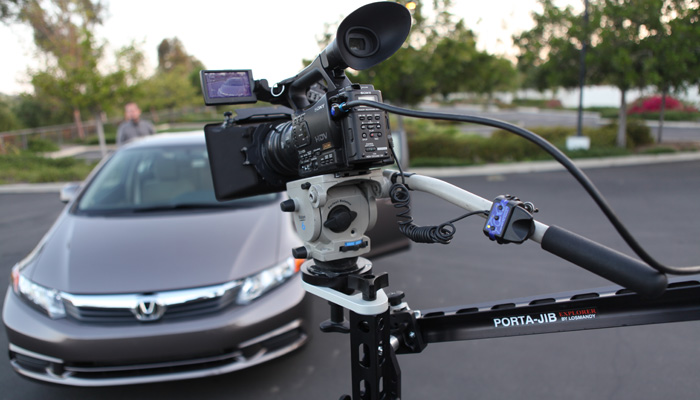
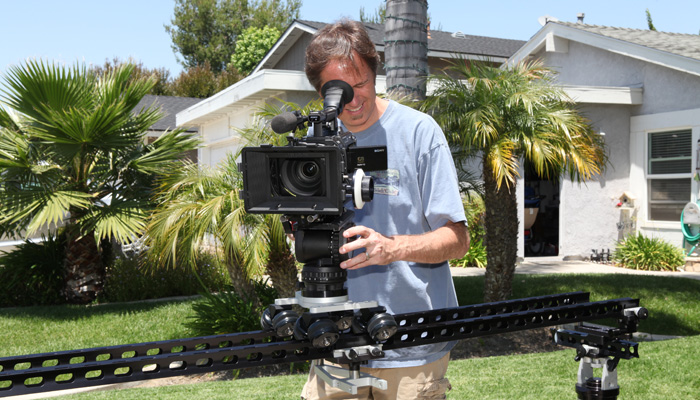
  • We are using mostly zooms on this shoot for moving fast. The RED 18-50, RED 50-150 and the Tokina 11-17 PL. We have the full set of RED primes with us but have decided to lean on the zooms. A lot of the work is being done from my Porta-Jib Explorer camera support system. We are using both the JIB and the slider configurations so the zooms are coming in handy.

  • Playback is still forthcoming so we are treating this like a film shoot. If the client wants to review a shot they go over to the DIT station and look at it there. (usually after the card has gone in for offloading). It will be great when it is put in a future build.

  • The media management seems pretty straight forward. Very much like an EX workflow. We are getting the MacBook Pros to play back at 1/8 resolution in REDCINE-X with out much problem. No real color adjustments are being made on the set - We just check to see when there is a problem that we will be able to remove it in post.

What a great camera package for digital cinema. I'm looking forward to the next time I get to shoot with this camera.

Until next time, good shooting.

TDTrey.com

Thursday, November 3, 2011

Exit the ScarLETUS - Enter the Scarlet-X !!!

AWESOME!!!!!!!!!!!!!!!

I was at the Technology Expo in Burbank today, visiting the Canon booth, waiting to hear the good news about their new $6K HD camera like everyone else. They had no news. The Paramount team hadn't called yet. At 3:30pm I started getting phone calls about the Canon presentation at Paramount: The camera is cool, great form factor, very sharp.... then the price came out -- $20,000 freakin' dollars!!!

Hop over to RED. The stage is set. Every one is hoping for a Hail Mary and RED delivers!!! A gigantic round for their bazooka. Dead hit! 4K Super 35 for under $10K Yippee Cy Ya M... F....

Sorry. I'll reel in the enthusiasm a little. I've just been waiting for this camera for soooooo long. I got a fast track lesson on the EPIC yesterday. I'll be shooting with it next week. I was very impressed. I had relegated myself to the idea that the Scarlet could possibly fill a gap for me until the EPIC-S/Scarlet S35 eventually came on the scene. As in my ScarLETUS blog I was even planning a way to make the fixed 8x lens concept work for the mean time with my 35mm LETUS adapter. Well I don't have to worry about that anymore =)

I'll just say that my EX3, 5D and F3 were filling in the gaps and if I were to buy another camera it would need to really stand out. EPIC not withstanding, (out of my price range) the EPIC-S was going to be the only contender for that position but had reportedly gotten pushed to the back of the line - SOOOOO glad that RED brought it out as the Scarlet-X.

Great job RED!!! Now I can look forward to the Digital Future with hope =)

Until next time, good shooting. (Go RED!!!)

TDTrey.com

Wednesday, November 2, 2011

Zeiss ZF.2 lenses with the DuClos Cine-Mod on the F3

Well we had the chance to spend some quality time a Duclos Lenses last week and try out the new Zeiss ZF.2 lenses with our F3. These lenses all had the Dulcos Cine-Mod: aperture de-clicked, solid focus gear added and an 80mm front ring put on. These were fantastic.

Matthew Duclos took us through the 5 lens kit they are now offering - what a cool deal. They also have these available for rental as kits configured with 5 or 9 lenses. The typical group consists of a 21mm, 28mm, 35mm, 50mm (macro) and an 85mm. You can also get an 18mm, 25mm or the 100mm (macro).

Zeiss makes a great lens and the Cine-Mod just adds to the experience. A very robust a solid feel with the added features of the focus ring and the common 80mm front. The rotation of the barrel is 270 degrees to 360 degrees in some cases - very nice. To that, very little breathing.

The images from these lenses are very sharp and clear. I did not see any contrast ratios that were out of range or false sharpness. CRI seemed right in there with our Sony PL primes. We did a comparison between the 50mm PL prime and the 50mm ƒ2.0 Zeiss and focal length was identical (within an inch at 10 feet side to side) and the Zeiss was a little faster. (I'll post some frame grabs soon)

Over all I think these lenses are a great addition to any camera package and deserve a closer look.

Until next time, good shooting

TDTrey.com


Sunday, August 7, 2011

Adobe Premiere Pro CS 5.5 for the Mac

Well it's a whole new world... FCP is, well, X'd... Like many others I've been clinging to my FCP 7 but with the announcement of Apple shutting down any future support or development for Color and many of the short comings of FCP X I am looking to other NLE possabilities.

After looking into many options I decided I wanted to find a "bundled" package similar to Final Cut Studio - Enter Adobe's Production Premium Bundle: Premiere Pro, After Effects, Photoshop, Illustrator and the list goes on and on. I had been waffling because I didn't want to spend the $1500 full street price and just then Adobe dropped the crossover price to $850 - Yeah!!! So I downloaded the 30 day free trial. (If you do this, make the time to give it a real good try. I was put off the first afternoon because I didn't give it enough time to set in to my way of thinking.) I can officially say that after 3 weeks of testing and learning I have made leap and bought the bundle.

The cool things for me are round tripping with After Effects, Photoshop and Audition. Also the importability with many different CODECs and formats. I just dropped a bunch of footage from my EX3 in after choosing the right sequence settings and there it was in realtime - pretty nice.

I'm using mine on an older MacPro (2006) tower 2.66 Quad Core with a Black Magic Design Intensity Pro video output card. I just upgraded the driver to 8.2.1 and it seems to work fine. I'm going to upgrade the CPU soon and add an NVIDIA FX4800 GPU card to activate the Mercury Engine features of the package. I hope to have more info on that soon. For the mean time I am putting it up against my FCP 7 package and working through the similarities and differences. So far so good.

Until next time, good shooting or editing

TDTrey.com

Saturday, May 28, 2011

Porta-Jib Explorer


I have been following the Porta-Jib product lines for a few years now and am constantly impressed with each new creative tool they come up with. Most of my work revolves around talking head and product shoots. And usually are steeped in a long shot list with a short time frame. Creativity is generally the first casualty of the shooting day. With the Explorer system, I’m finding I can “buy back” some creativity / inspiration without much cost to the day.

I recently used the Explorer on a car review for Kelly Blue Book and was extremely pleased. The director said “Sure. Bring it along. But I don’t want to be slowed down or have to sacrifice shots while you are fiddling with adjustments.” I’m happy to report we finished 15 minutes early and had at least 5 extra shots in the can. He loved it!!! We never came off the system. We did both JIB shots and then worked the heck out of the TROLLEY / SLIDER config.

I’ve used the system with everything from a SONY Z7 to a SONY F3. (And that includes my 5Dmk2 and EX3). The Explorer system seems right at home in any environment. I see this system as a fantastically versatile opportunity to recapture some of the excitement and creativity we all enjoyed when we were first starting out.

Thanks Mark and Scott. Great Job!!!


Check out my video review - Trey's Gear Review: Porta-Jib Explorer

Until next time, good shooting =)

TDTrey.com

Sunday, April 10, 2011

IR filters for the Sony EX cameras

Defining the problem
If you have used the Sony EX1 or EX3 in a setting with black or gray fabrics you may have seen a magenta shift in the picture. One little catch with the new Exmore sensors is they have a big sensitivity toward the Infra Red (IR) spectrum. We did a bit of testing here and found a good workaround with some screw-on IR filters.

As you can see in the pictures the uncorrected shirts have pretty a good magenta shift. The set is lit with one Diva 400 at 3200k. We found in interview settings under either 3200k or 5600k the shift still happens. We talked to a few filter manufacturers and narrowed it down to Tiffen and Schneider. Both had nice offerings for IR filters. Tiffen has their series call Hot Mirrors and Schneider suggests the 77E IR cut (486). We found that the 77E (486) worked the best on both our EX1's and then the EX3's. So far we have not noticed a need for the IR filters on our Sony F3. Yay =) Originally the 486 was sold as the best filter for the RED and the Hot Mirrors were the best for the EX cameras but as we tested the opposite was true and that's why we went with the 77E (486) for our cameras.

Care and Handeling
At first we were putting the filters on when we saw the problem and then removing them after the shoot as they are almost $300 each... After a while we realized the potential to damage the filter when adding or removing it was greater than just replacing our UV filters with the IR filters permanently.

Playing well with others
The filters seem to work well in conjunction with other filters and 4x4s in line. We have had no problems using the IR filters and screwing our Polarizers on in front of the IR.

Best of luck with your filters and lens kits.

Until next time, good shooting.

TDTrey.com