Showing posts with label filmmaking. Show all posts

Thursday, November 12, 2015

Davinci Resolve 12 - Flippin' Fantastic Again

Well. Blackmagic Design has done it again - Davinci Resolve 12 is awesome!!!  I've been working with it for about 2 months now and I love all the new features.  Here a quick example:

This week I worked with a long time client who used a new high speed camera from Fastec to shoot an art project.  They were capturing all the footage at 600 fps in DNG raw files and then aiming for a 24p output.  Since this method leaves all the footage in image sequence folders it sometimes makes it a little tricky to review the files and work with them.   
Enter Resolve 12...

Resolve has long been able to read image sequences as clips automatically and then pop them into the media pool as needed.  In this project I simply double clicked each clip folder to load the clip into the source view and then reviewed the clip.  When we found a take we liked I'd pull it from the source viewer into the media pool.  After we found the hero shots I was able to throw them on a timeline and start editing.  BTW this is all in Resolve 12... All in RAW dng - no conversions or proxies.

Once the timelines were built, I went into grading mode and did a little cleanup shot by shot.  The client needed the clips mainly as proof of concept at this point so H264's were fine.  I simply went to the delivery page, chose 264 and entire sequence, added the job to the render Q and was on my way.

The client had done an After Effects session with the footage to look at it earlier in the week but found that difficult to keep a creative focus as there we many steps to get to the end product.  This was so fast, from ingest to output, he now has great confidence about the project moving forward. 

I think the folks at Blackmagic Design have done it again.  This is a terrific step forward for all departments in the video world.

***UPDATE***

So the day after I posted this blog they released Resolve 12.1
Here's the official feature scoop:  

Remote rendering on DaVinci Resolve Studio
Support for native display color profiles on OS X
Preferences option to enable 10-bit precision on viewers on OS X 10.11 El Capitan
Ability to select clips when in blade mode
Support for faders on generators and titles
Ability to extend freeze frames from the start of the edit  
Ability to media manage selected clips on a timeline
Ability to perform negative timecode offset in clip attributes
Improved support for sub-clips from FCP7 XML
Improved rendering of audio transitions (cross-fades) and audio faders
Auto scroll during timeline item resize
Improved sorting in media storage and media pool
Support for smart bin filtering based on clip type
Ability to move clips and timelines from a smart bin view
Support for moving files to the trash instead of deleting them permanently when using the media manager on both Mac and Windows systems
Ability to delete multiple projects and folders in project manager
Ability to decompose a compound node
Ability to grade nested timelines  
Ability to filter clips based on whether they have keyframes
Ability to manually keyframe power windows in frame mode even without tracking
Ability to freeze the current frame on an external matte
User option to copy flags and markers when performing ColorTrace
Improved ACEScc support
Support for stereo decision list (SDL) v0.25
Support for RED SDK v6.0.4
Support for embedding timecode in audio output
 

Until next time, good shooting and editing and grading,

Wednesday, June 25, 2014

My New Sigma 50mm ƒ1.4 DG HSM Lens

I just picked up my new Sigma 50mm ƒ1.4 DG HSM Lens from Samy's Cameras on Monday - Wow!!!  I've been waiting for it to come on now for about 2 months and it was worth the wait.  All the research I've done says this is one of the sharpest lenses to come along in a while and they are right. 


I'm using this lens on my 5D3 rig.  This is one in a new line of lenses from Sigma.  They also offer a 35mm ƒ1.4  Full Frame and a 18-35mm ƒ1.8 zoom for an APS-C size sensor.  

The skinny:
  • Very sharp - all the way to ƒ1.4
  • Great contrast
  • Great color rendition
  • Smooth focus ring
  • Fast auto focus
  • Nice ergonomics
So of course I wanted to shoot an image as soon as I got it and had 2 choices; the cats or the bird feeders ( man!! I'm getting old =).  So forgive the not so scientific photos... I will post some real shots and video as soon as I get a chance.


Along with the lens I added a cool little focus gear from DLC called a DL-V/Band.

It went on really easy and is nice and snug. Not too much extra hanging over to catch on the camera rig.  Smooth feel with my Chrosziel follow focus.  $15 USD.

All in all a nice ad to my kit.  I was holding out for a Rokinon 50mm Cine lens but as they seem to never want to make that lens (rumors be damned!!!!) I thought it's time to make a move.  Stay tuned and I'll post some more info as I discover it though use.

Until next time, Good shooting

TDTrey

Thursday, June 12, 2014

CineGear 2014

Well it's that time of year again - CineGear!!!


Seems like 2014 is the year of the copter and the gimbal.  


There were more copter offerings and camera support systems then I could shake a Steadicam at.  When you first walked in there was a copter & gimbal booth just waiting for new folks to have a peek.


All the usual suspect were there and many new ones.  This year I had a short list of items I was interested in.  I'm mostly looking at camera support and control.  Things like wireless video, wireless follow focus, a basic copter solution and I'm paying close attention to the race for the winning handheld gimbal kit. The camera race is definitely heating up but I don't think I'm ready to jump into 4K yet and since that race is just getting started at the consumer and prosumer level, I'm hoping more time will lead to better product and pricing.

Here are some of the cooler rigs


But the best one of all (Yes.. the USS Enterprise.  We are at Paramount after all =)


For me, I found something I was looking for on every street.  Teradek had a nice offering with their updated Bolt Pro line of wireless video.  Noe it can work up to 2000 feet line of sight.  I also checked out IDX and Paralinx.  I think, for now, I might lean towards the Paralinx Arrow solution as I mostly need a multicast function with near zero latency.

I stopped by the Redrock Micro booth and took another look at their wireless follow focus the MicroRemote.  Still looks nice.  I wish they would come out with the iPhone controller they showed in 2012.  Zacuto has a really cool lens control system that works in a grip form factor called the Control Grip.  It's a 2 motor system that can control either Zoom and Iris or Focus and Iris.  It's still in the testing stage and should be out later this year.  I wish I had known about the new TitlaMax focus system from Tilta.  I just saw this yesterday and would have loved to check it out in person.  It is a 3 motor system (FIZ) with brushless German motors and a nice IPS touch screen for easy configuration and display.

One of the best things I found is from Woodencamera.  It's their multi connector breakout box: the C-Box.  It can take HD-SDI and/or HDMI in and then send the signal out 3 HD-SDI BNCs and 2 HDMIs all at the same time.  Wait, it get's better...  You can put a battery mount on one or both sides so it can function as your power distro with 2 D-Taps or clip on to an existing battery mount as an add on to extend a system. Nice!!!

It was a nice show this year.  I ran into a lot of friends there and saw a bunch of great new gear.  Can't wait till next year!!!

Until next time, Good shooting

TDTrey

Tuesday, March 18, 2014

The Big Small Rigs...

So here is a cool version of my 5D3 rig with my iPad Prompter on it.  It's pretty tight.  The prompter is driven by my Macbook Pro using a display mirroring software over WiFi.  The system is pretty light weight all things considered and I can take it handheld if needed.  I am using an ATOMOS Samurai Blade to record in ProRes straight out of the camera's HDMI. It also records the final audio in sync with the picture.

Here is another version of the rig using a SmallHD AC-7 monitor for the field.  I like the size of the AC-7 and how bright it is.  This is the rig when clients want to record right to CF and not deal with the ATOMOS. 

With the focus on new cameras looking toward 4K this year it will be interesting to see how the world of the 5D fairs.  I am intrigued by the GH4...  I have clients still asking for the 5D3 and the 5D2.  they like the look of the full frame sensor and want to go with a known camera.  I think I'll get another year or two out of this rig. 

Until next time, Good shooting

TDTrey

Monday, February 10, 2014

Blackmagic Production Camera 4K is Here!!! And it's CHEAPER - YAY!!!

I just received word from BMD that the BMPC 4K is shipping as of today.  I checked B&H and a few other sites and they are still showing it as a pre-order item but the press release just hit a few hours ago.  Along with the terrific news of official shipping it is also making it's debut at a lower price point $2995.  Down $1K from the original MSRP.  It is still shipping with a full copy of Resolve  and appears not to have lost anything in the process.  First thing I checked was the BMD site for the specs and everything still appears to be there so it's all good.  Hopefully as the units start making their way into the market a few review units will drift into bloggers hands =)  I'll keep you posted.  For now please see the full press release below and let me know your thoughts.

Fremont, CA - February 10, 2014 - Blackmagic Design today announced the Blackmagic Production Camera 4K is now shipping and with a new low price of US$2,995. This new low price will be available for all customers, including existing pre-orders. Blackmagic Production Camera 4K is available now from Blackmagic Design resellers worldwide for only US$2,995.

“The support from the creative community for the Blackmagic Cinema Camera and Production Camera 4K has been amazing,” said Grant Petty, CEO, Blackmagic Design. “As with all of our products, we work hard in production to reduce costs so we can pass along the savings, even to our first Blackmagic Production Camera 4K customers. The Blackmagic Production Camera 4K is a perfect companion for ATEM Production 4K switchers and we hope the new low price will help more customers to expand their Ultra HD live production set ups with even more camera angles!”

Blackmagic Production Camera 4K is a super high resolution 4K digital production camera for Ultra HD television production. Featuring a large Super 35 sensor, professional global shutter as well as EF and ZE compatible lens mount, the Blackmagic Production Camera 4K captures high quality ProRes™ files, giving customers a complete solution to shoot amazing high resolution music videos, episodic television productions, television commercials, sport and documentaries.

The Blackmagic Production Camera 4K has everything customers need right out of the box including a built in SSD recorder, rechargeable battery and a large 5” LCD touchscreen. In addition to focusing and monitoring shots, the touchscreen also lets customers enter metadata and change camera settings all on a single easy to use interface. Customers also get a full copy of DaVinci Resolve for amazing quality color grading and finishing for Mac OS X and Windows computers.

  • Ultra HD 3840 x 2160 resolution
  • ProRes 422 (HQ)™ recording
  • Super 35 sensor
  • Global shutter
  • EF and ZE compatible lens mount
  • Built-in SSD recorder
  • 5” LCD touchscreen
  • Metadata entry
  • 6G-SDI output for 10-bit HD and Ultra HD
The Blackmagic Production Camera 4K is available now for US$2,995 from Blackmagic Design resellers worldwide.

Until next time, Good shooting

TDTrey

Saturday, September 14, 2013

Blackmagic Design has big announcements from IBC

Some really cool stuff coming from Blackmagic Design at this year's IBC.  Looks like the new Beta 10 version of DaVinci Resolve is now available for download at Blackmagic Design Support.  This is the all new version that was originally announced at NAB earlier this year.  Some of the cool new features are:
  • Resolve Live-live grading of the incoming video signal from the camera
  • Enhanced editing features
  • Multitrack editing with support for up to 16 tracks of audio per clip
  • Expanded support for more NLE's via XML and EDL
  • Support for OpenFX plugins
  • Support for mixed frame rates and media types
  • Fantastic updated to limiting, qualifiers and power windows
  • Outstanding workflow features for window burns, file naming overlay and audio syncing of secondary tracks to picture
  • and much more
Grant Petty, CEO, Blackmagic Design was quoted saying:
 “We are extremely excited to have this public beta of DaVinci Resolve 10 ready for download from the Blackmagic Design web site,” said Grant Petty, CEO, Blackmagic Design. “This is an important update for all DaVinci Resolve customers and dramatically boosts the ease of workflow in the television industry. This new public beta is available for high end DaVinci Resolve systems as well as the exciting free of charge DaVinci Resolve Lite edition which now includes support for UHD timelines and rendering. This is an exciting moment for DaVinci Resolve because its the biggest update to a DaVinci product line in 30 years!”

Another cool announcement was regarding the new Desktop Video version 10.  With the onset of 4K coming faster and faster BMD felt it was time to completely revamp the Desktop Video architecture from the ground up. Aimed at helping the UltraStudio 4K and the DeckLink 4 products, this upgrade will make the ever changing job of managing signals around the edit bay, design center, paint and color correction rooms a breeze.

Please check out all the new goodies at BlackmagicDesign.com

Until next time, Good Shooting

Tuesday, February 26, 2013

Adobe CS6 Production Suite and The Animated Fairytale

Well, we just finished recording the narration for our new animated short - working title: "The Birthday Princess".  It's a cute story about a princess and her mother, the queen.  The princess learns many life lessons during one wonderful afternoon.

We recorded at Stewart Sound in Santa Ana, California using ProTools as our DAW.  All the files are in straight AIFF.  Dave Myslek, "Wookie", our engineer was awesome!!!  From there we will move almost completely into the Adobe Production Premium CS6 suite. We are editing the dialog in Adobe Audition for the rough cut.  We'll also use Audition for the final sound design and mix out at the end of the project.  In the middle we will use a combination of Premiere Pro 6 and After Effects to bring the animation to life.

Once the dialog is roughed in we will be giving it to our animators.  We'll continue the sound design during the animation process and give them the final audio locked dialog + M&E tracks in the home stretch for fine tuning.  We'll then use Premiere to do the final video edit and layback of the mix.  Output will be done with Adobe Media Encoder.

We are using Smart Sound to create the music. Their product, Sonic Fire, is a fantastic tool to create an "almost" original score.  If you haven't checked this software out yet, I highly recommend it.  You can create very original sounding pieces of music from their library and tailor the cues to meet and match your project.  Add hits, mood changes and even variations in side of one long piece of music.  We pulled our temp tracks while we were editing the narration selects - Very Cool.

This is one of the new projects we are starting for 2013 at Polydactyl Pictures.  We hope to have good luck with it at the festivals.  It will also allow us to build "the machine" a little more before jumping into some of the larger projects we have on the horizon.

I realized this piece sounds a lot like a sales pitch for many of the software companies - but I really just want to show a step by step of the process.  I want indie filmmakers have yet another road map to follow showing different kinds of projects and their workflows.  Indies (including ourselves) need to have resources at our fingertips to help keep us creative and forward thinking =)

Stay tuned.  I'll be posting our progress on "The Birthday Princess" as we go.  When we find out something cool (or problematic) I'll give you an update and suggestions.

Until next time, good shooting, editing, animating, mixing....

Monday, August 27, 2012

DaVinci Resolve 9 Flippin' Fastastic

Black Magic Design released the Beta version of their new DaVinci Resolve 9 Lite week before last.  You can download it for the Mac here.  

It's a great new look and feel to this wonderful application. I love the new layout.  Still has all the tools you need -- they are just in a better placement now.  And, you don't have to be as much of a rock scientist to figure out how to "make it go"  =)

I decided to jump in with both feet.  My friends are on the home stretch of their first feature and asked if I would be willing to have a go at the grading.  I said...Suuuure, why not.  It's a fun vampire flick with all sorts of twists and turns.  It was shot on the Panasonic HVX 200.  INT's, EXT's and mixed lighting - a real good test.  Check it out here.


The new layout only took a little while to get familiar with and helped to really speed things up.  Things I liked best right out of the gate:
  • Improved Layout
  • Better Scene Detection feature
  • Smarter HSL keying
  • Easier access to Primaries and Wheels
  • Smart gallery access
  • Fantastic Motion Tracking!!!!!!
    • Super easy to use and link
  • Delivery TAB for outputting
  • Premiere Pro 6 support
This is all from me using the Beta 3 version for only about a week.  As I dig into the app I'll update this post.  Feel free to add comments to help all the readers =)
I got this project as a full length ProRes movie and used the scene detection feature to split it up and conform it.  Took just a little tweaking and it worked great.  A lot of the content is set in a dark or flat location so I had to pickup a few of the cuts as they were hard to discern for the detection threshold I had set - No biggy.

The vignette and power window features are very nice.  Made it easy to correct windows, clothing, walls... everything!!!

The delivery TAB is now super easy to use.  You can make your own custom  output settings and then save them for future use or just take advantage of one of the many presets.  A new feature I like is the fact that you can set multiple outputs and then place them in the render que and walk away.  Each output can have it's own settings and destination.

Well, that's it for now.  I'll add more as I go.  Just wanted to give props to BMD for delivering such a great update to an already awesome tool.

Until next time, good... grading

TDTrey.com

Monday, April 9, 2012

Which Camera(s) cont'd - Sony FS700

Well, looks like Sony has gone and done it again.... The FS700 is the new camera to beat. I thought I would wait until the dust settled to put my two cents in. I've got nothing to report that hasn't already been written -- Other than WOW!!! wait... I read that somewhere too...

This seems like what the C300 should have been, what the Scarlet X might have been and what we were hoping the 5Dmk3 would have been. And it's a Sony =)

I was very intrigued with the FS100 but not completely sold. And have been looking for a way to use my Canon EF glass to make the package a done deal. I found the Metabones adapter for the lensing and the battery support for running all my monitoring but was not just there yet... Then I was hipped to the FS700 last Monday and everything changed.

Looks like the new camera route might be to get the FS 700 ASAP. Shoot the 5Dmk2 for as long as I can. Rent the Mark III when needed. Adapte the 5D cage to the 700 for maximum use. If I still get requests for the 5D a lot upgrade later and replace the mark II....

Exciting times my friends... exciting times indeed!!!!

Good FS700 resources:

Andy and AbleCine - Video Overview

Den Lennie

Frank Glencairn


Well that's it for now. Until next time, good shooting.

TDTrey.com

Thursday, March 8, 2012

Which Camera (cont'd) 2012

Well it's 2012... Yeah!!!

And now we have a few more camera choices - woo hoo!!!

The Canon 5D Mark III is finally on the horizon with the Nikon D800 giving it a good run for the money. The flagship DSLRs are also coming out soon. Then onto the big boys, the Sony PMW-F3 now has S-Log built in and the RED Scarlet-X is more then we were really hoping for (or at least the proposed version =) The Canon C300 seemed to be the best of all worlds except for the price tag... As for me, I'm caught in a spiral of full frame DSLR or Super35 camcorder.

I currently have an EX3 and a 5D Mark II both of which get pretty regular work. The 5D2 has picked up a little more action this year which is great. I'm waiting to see what happens at NAB - it's going to be crazy this year!!! The acceptance of 35mbs /sec has been hanging in there for a while but now with the Mark III at an estimated 90+ mb/sec it could set a new standard for most cameras. If I go on with the DSLR plan I'll likely go to the 5D3 first and then the next offering (4K ?) after that. I do have to say the Nikon line up is looking pretty good. I was all Nikon for years and then moved to the Canon side of the street when the 5D came out. Clean - uncompressed 4:2:2 is a step in the right direction for sure... I'm waiting for a box with any mount and a clean out, place for a monitor and external recorder!!! This would be the best solution ever -- just change out the body when a new one comes out. Maybe later this year??

At any rate the next 2 months will be really exciting!!!

Until next time, good shooting.

TDTrey.com

Sunday, August 7, 2011

Adobe Premiere Pro CS 5.5 for the Mac

Well it's a whole new world... FCP is, well, X'd... Like many others I've been clinging to my FCP 7 but with the announcement of Apple shutting down any future support or development for Color and many of the short comings of FCP X I am looking to other NLE possabilities.

After looking into many options I decided I wanted to find a "bundled" package similar to Final Cut Studio - Enter Adobe's Production Premium Bundle: Premiere Pro, After Effects, Photoshop, Illustrator and the list goes on and on. I had been waffling because I didn't want to spend the $1500 full street price and just then Adobe dropped the crossover price to $850 - Yeah!!! So I downloaded the 30 day free trial. (If you do this, make the time to give it a real good try. I was put off the first afternoon because I didn't give it enough time to set in to my way of thinking.) I can officially say that after 3 weeks of testing and learning I have made leap and bought the bundle.

The cool things for me are round tripping with After Effects, Photoshop and Audition. Also the importability with many different CODECs and formats. I just dropped a bunch of footage from my EX3 in after choosing the right sequence settings and there it was in realtime - pretty nice.

I'm using mine on an older MacPro (2006) tower 2.66 Quad Core with a Black Magic Design Intensity Pro video output card. I just upgraded the driver to 8.2.1 and it seems to work fine. I'm going to upgrade the CPU soon and add an NVIDIA FX4800 GPU card to activate the Mercury Engine features of the package. I hope to have more info on that soon. For the mean time I am putting it up against my FCP 7 package and working through the similarities and differences. So far so good.

Until next time, good shooting or editing

TDTrey.com

Saturday, May 28, 2011

Porta-Jib Explorer


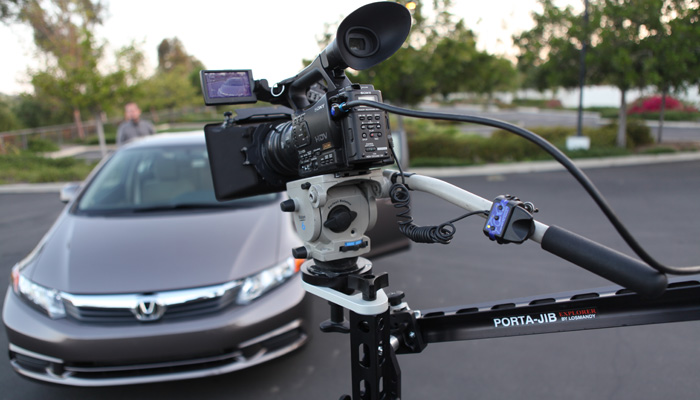
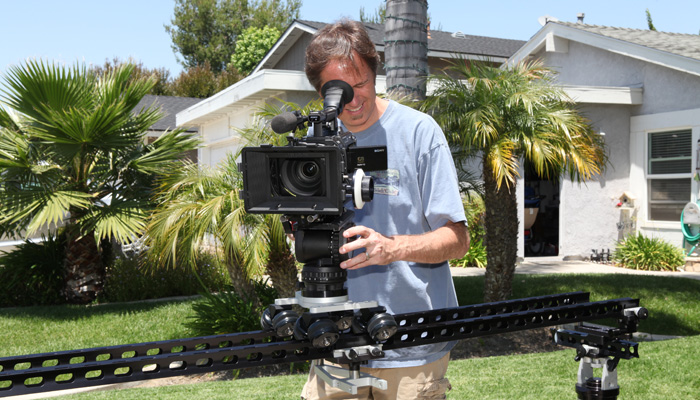
I have been following the Porta-Jib product lines for a few years now and am constantly impressed with each new creative tool they come up with. Most of my work revolves around talking head and product shoots. And usually are steeped in a long shot list with a short time frame. Creativity is generally the first casualty of the shooting day. With the Explorer system, I’m finding I can “buy back” some creativity / inspiration without much cost to the day.

I recently used the Explorer on a car review for Kelly Blue Book and was extremely pleased. The director said “Sure. Bring it along. But I don’t want to be slowed down or have to sacrifice shots while you are fiddling with adjustments.” I’m happy to report we finished 15 minutes early and had at least 5 extra shots in the can. He loved it!!! We never came off the system. We did both JIB shots and then worked the heck out of the TROLLEY / SLIDER config.

I’ve used the system with everything from a SONY Z7 to a SONY F3. (And that includes my 5Dmk2 and EX3). The Explorer system seems right at home in any environment. I see this system as a fantastically versatile opportunity to recapture some of the excitement and creativity we all enjoyed when we were first starting out.

Thanks Mark and Scott. Great Job!!!


Check out my video review - Trey's Gear Review: Porta-Jib Explorer

Until next time, good shooting =)

TDTrey.com

Sunday, April 10, 2011

IR filters for the Sony EX cameras

Defining the problem
If you have used the Sony EX1 or EX3 in a setting with black or gray fabrics you may have seen a magenta shift in the picture. One little catch with the new Exmore sensors is they have a big sensitivity toward the Infra Red (IR) spectrum. We did a bit of testing here and found a good workaround with some screw-on IR filters.

As you can see in the pictures the uncorrected shirts have pretty a good magenta shift. The set is lit with one Diva 400 at 3200k. We found in interview settings under either 3200k or 5600k the shift still happens. We talked to a few filter manufacturers and narrowed it down to Tiffen and Schneider. Both had nice offerings for IR filters. Tiffen has their series call Hot Mirrors and Schneider suggests the 77E IR cut (486). We found that the 77E (486) worked the best on both our EX1's and then the EX3's. So far we have not noticed a need for the IR filters on our Sony F3. Yay =) Originally the 486 was sold as the best filter for the RED and the Hot Mirrors were the best for the EX cameras but as we tested the opposite was true and that's why we went with the 77E (486) for our cameras.

Care and Handeling
At first we were putting the filters on when we saw the problem and then removing them after the shoot as they are almost $300 each... After a while we realized the potential to damage the filter when adding or removing it was greater than just replacing our UV filters with the IR filters permanently.

Playing well with others
The filters seem to work well in conjunction with other filters and 4x4s in line. We have had no problems using the IR filters and screwing our Polarizers on in front of the IR.

Best of luck with your filters and lens kits.

Until next time, good shooting.

TDTrey.com

Sunday, January 30, 2011

5DmkII All Grown Up

So since my last entry for the 5D I have added a few new goodies to the rig... As you can see (kind of) I have the whole enchalada mounted in an cage (love it) which makes grabbing this camera and using it a dream. The cage is made by Easom and this particular version is called the Halo. It provides 2 ribs for connecting the upper and lower sections and I have them staggered here. Their other model called the Solo has only 1 rib - an equally nice cage. Also I found a great D-Tap power distribution company: Hawk-Woods in the UK. They sell a kit that allows you to use you V-mount batteries with DSLRs by way of voltage regulating the power with the adapter that goes into your camera where the battery fits. Now I power my camera, monitor and any other goodies from a single B4B V-mount battery. This is a mid sized battery 6Ah/90Wh and lasts about 2 to 3 hours each.

To go with the "all growed up" look I added my RedRock follow focus and CA Vision matte box. I had to go up to 18" rods to make everything fit and balance out but it all sits there nicely now. I put a small Pony clamp on the back of the cage handle and slid both of my Sennheiser wireless receivers on there for a tight cable package. I used XLR splitters to feed the mic's outputs to both the ZOOM and the 5D at moc level. There is an XLR to stereo mini adapter cable in there going into the 5D itself.

Rounding out the system I have a Zoom H4n mounted to another part of the cage and my Marshall monitor is being held on my a Manfrotto mid sized articulating arm. It all fits... and comes in at about 16.2 Lbs.... ouch =) I have another Noga arm on order that should drop a pound or two off the total weight of the package. I'll keep you posted.

TDTrey.com

www.filmmakingwebinars.com

This new and not new site is terrific!!! They offer really helpful tips and tricks on digital film making, media managing and all sorts of other great tools for aspiring movie makers. So, I'm a little biased... they have asked me to do a segment on corporate events and how to cover them ENG style.

This company is a part of NewMediaWebinars.com which has been around for some time. Great work on bring info to the masses. This particular webinar that I am doing will focus on the steps used to do a successful coverage of a corporate event or retreat. We will talk about planing the shooting days out. Shooting for the edit. Camera choices and media management techniques. It should be helpful for viewer of all skill levels =)

The Webinar will be live February 17th from 10am to 11:30am PST and the be available for download starting the next day. There will be a small price for the download version but you will get a lot of extras that won't be in the initial live airing. To listen and view check out www.filmmakingwebinars.com for all the latest info.

Thanks for stopping by. Until next time,

TDTrey.com

Thursday, August 12, 2010

ZOOM H4n Digital Recorder

Recently got to use the new ZOOM H4n on a project to track GOPRO cameras in a car interior setting - Worked great. We first used them with the internal mics place near the interviewee - that worked OK but had a little too much road noise. Plan B, we already had the people miked from the other part of the interview process with Lectrsonic 195 systems so we just added the ZOOMs to our field mixer bags and set those in the back seat during the "on-the-road" interviews and used hand claps to sync them up later. Sounded great.

Things we learned:
  • 4gig - class 4 cards were fine
  • 48/16 WAV files fit right into the edit
  • Batteries would last almost all day - 10 hours
  • New front panel design was much easier to read and operate
  • Mic level in to the XLRs from the mixers worked great*
  • Gain staging mixer to H4n had plenty of wiggle and head room
  • Make sure you don't bump the MIC/1&2 buttons - Silence... OOPs
*In preparation I had done a lot of reading up on the new H4n and most said "no line in". I understand the combo inputs are designed to accommodate HIGH impedance signals from guitars and basses 10k. Well I did some testing after the shoot, -10 line out of my FP33 @ 0vu yielded a nice signal when the record levels on the ZOOM are set relatively low. No sonic coloration that I could hear - Tone and Dialog.

I have the H2 and the H4n. The H2 stays with my FP33 as a piggy back dual system recorder and the H4n stays with the 5Dm2. Nice kit to have...

TDTrey.com

Friday, May 21, 2010

My 5D Mark II has arrived !!!

OK OK... So I held off as long as I could. The first time I saw the photos of the all rigged out 5DmkII I thought WOW!!! Then I told myself I was just judging a book by it's cover. It looks very cool -- but it's not ready for video yet.

So I waited, patiently, with my EX1 and EX3 by my side. My trusty LETUS 35 Extreme always ready... Then it started happened. People I knew started asking for or using the 5D and 7D on their projects. TV shows started using them. Canon released the firmware updated for the 5D -- now it was a whole different ballgame. Workable frame rates, better control over the sound (even if it's just a scratch track in most cases) and Zeiss has adopted the EOS platform as a real entity. All hail the CP.2 lens set...where's that winning lottery ticket....

I'm now into my third week of owning a 5DMKII. It took a week to figure out how to get it into video mode. My first subject - my big toe... Got almost a minute and a half out of that. Next it was on to real uses. I re-configured my RedRock rod system and V2 follow focus from the EX3 to work with the Canon 24 -70 2.8 L lens that I bought. Worked out the mount for my 7" Marshall monitor and tracked down the elusive spare Canon LP-E6 batteries. I was able to make my CA Vision matte box just fit the tall form factor of the 5D with the battery grip on it.

I'm off to the races -- or in this case an art showing for a friend to shoot a couple of interviews for the event. They turn out really pretty good considering the room was packed and I used only the light from a hanging PAR 64 blasting the art on the walls. I put the interviewees about 4 feet in front on the art and me about 3 feet in front of them. Not your ideal ratio - but it's what the room could handle. The DoF was not bad when I looked at the footage later. Important safety tip Egone... Just because you can go WFO with these lenses on the 5D and get everything really shallow - doesn't mean you should. The first interview went great because the interviewee stood still -- at ƒ2.8. The second person repeatedly leaned in to make her points. I didn't think it was that far... but she fell in and out of focus slightly through out the interview. To do it over, I would set my focal plane more forward or shoot an ƒ4.0. Still a good first outing.

I'll keep you all posted. Should be a fun learning curve. Have a great weekend.

TDTrey.com

Wednesday, April 28, 2010

To DIVA or not to DIVA... That was the question.

I have been working with tungsten based lighting forever and just recently got into KinoFlos and LED technology. Wow what a difference. Each technology has it strong points. I still love the way my open face pars wrap around people and objects -- but the flexibility of the Divas to conform to any situation is really great. The instant color change out and the dimming capability is perfect for almost everything.

As more and more LED instruments are available we are certainly working in a great time for lighting. But, I believe you will still need some good fire power to keep up with daylight spilling into (or onto) your set if there's no way to control it. The LEDs continue working there way up to the power of the Divas and the brute force of a Mighty Mole (at a reasonable price point) but will need a little more time to get there. Please send in a comment or suggestion if you know of some reasonably prices LED solutions out there in the 1K & 2K power range...

The bottom line is to use the instruments that work for you -- but also to be open to new technology when it comes to lighting. I recently bought two DIVA 400s from a friend and love using them. They compliment my tungsten kits perfectly. I'm a little late to the game for this config, but keying with 56K and using 32K for kickers and background is an awesome combination. Plays really nice in mixed light situations. And, you get full "poop" out of all your instruments. Very cool...

'Til next time,

TDTrey.com